A SMALL CARD. A SHARED MEMORY.
QR code templates for wedding photos and birthdays.
Help guests share photos and videos straight to your event gallery. Choose Art Nouveau, floral or modern minimalist cards and download a personalised PNG. Guests scan your code and upload without an app or guest account.
Three designs, one shared gallery
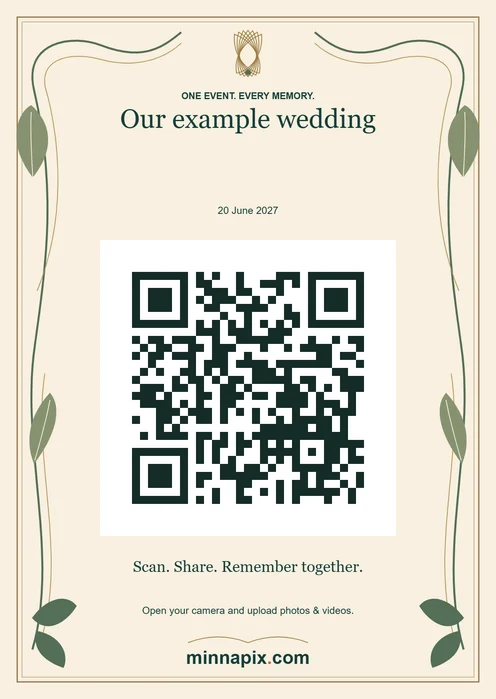
Art Nouveau
Flowing lines, stylised leaves and a delicate sage-and-gold frame on warm cream. A considered choice for elegant weddings, historic venues and formal tables.
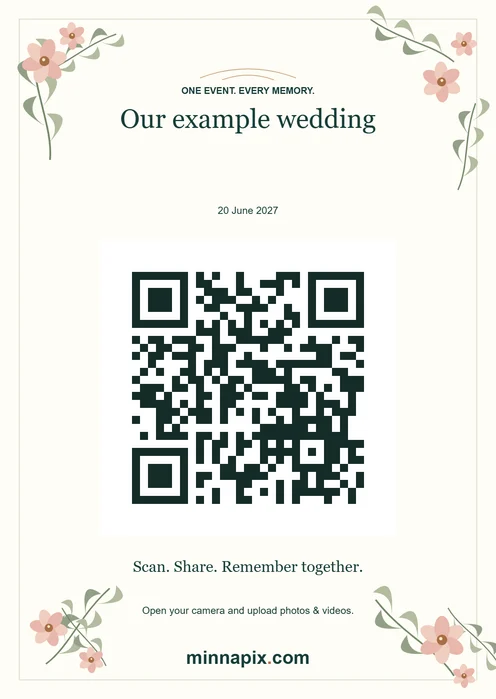
Floral
Soft blush flowers and loose green branches frame your invitation to share. A natural fit for garden weddings, spring celebrations and botanical birthday settings.
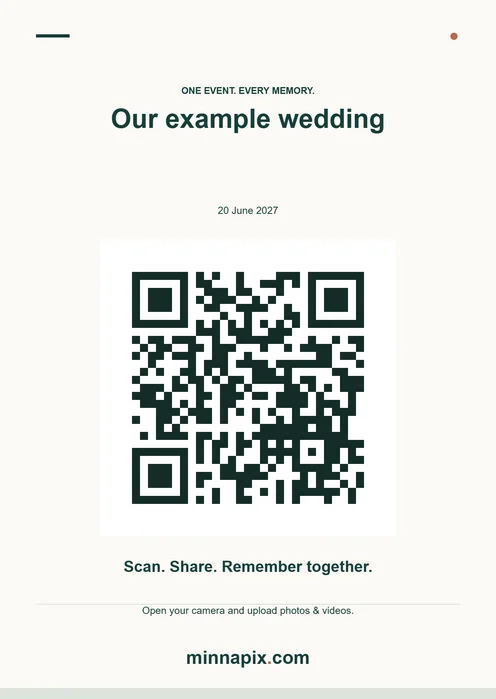
Modern & minimalist
Clear typography, generous space and restrained accents. This quiet design works with contemporary weddings, company parties and many different table settings.
These sample cards link to the public demo gallery. Create your personalised card with the correct event link in your host dashboard.
How to download your own QR table card
1. Create or open your event
Create a gallery with your event name and actual event date. If you already have an event, open your private management link. All three designs are also available on the free plan.
2. Open the QR card and choose a design
In the host dashboard, open the QR table card. Choose Art Nouveau, Floral or Modern & minimalist. Your event name, date and guest link are added automatically. Card instructions follow the selected app language.
3. Download the PNG
Save your chosen design as a 1240 × 1748-pixel PNG. You can download all three designs for the same event. Every card includes the MinnaPix.com logo at the bottom.
4. Print and test
Print at A6 size (105 × 148 mm) without cropping or stretching, giving approximately 300 pixels per inch. Scan the actual print on another phone. Uploads open seven days before the event; try a test photo then and delete it from your dashboard afterwards.
Make your printed QR code easy to use
- Keep the entire white margin around the code. Do not place flowers, stickers or an extra logo over the code.
- Display the card upright in good light, at the entrance or on tables. Highly glossy sleeves can reflect light when guests scan.
- Share the guest link as another way in. The gallery opens in the browser; guests do not need a separate app or a guest account.
- Share the card only with your invited group. Anyone with the guest link or code can open the event gallery. Never print your private management link on a table card.
Wording for your photo QR code cards
Use these short messages on an invitation or an extra table sign. The downloaded MinnaPix cards already include sharing instructions.
For a wedding
Our wedding through your eyes: scan the QR code and share your photos and videos with us. No app needed – we can’t wait to see your memories!
For a birthday
Thank you for celebrating with us! Scan the QR code to share your favourite photos from today. Let’s keep these memories together.
QR table card questions
Do the designs cost extra?
No. All three designs are included in every plan. The free plan offers 250 MB; Premium provides 2 GB for €2, and Premium Plus 10 GB for €5. Paid plans are one-time purchases.
Does changing the design change the gallery link?
The destination remains the same guest gallery. You can use different designs on different tables. If you change the event name, download the card again to update its printed text.
How long is the gallery behind the code available?
The gallery is deleted 14 days from the event date. Choosing a card design does not extend this period. Download your photos and videos in time; your host dashboard shows the expiry date.
Can I download the card on my phone?
Yes. Open the dashboard in your browser, choose a design and save the PNG. You can then transfer it to a computer or print it using a suitable printing app.
Do I get a gallery as well as a printable template?
Yes. Creating an event gives you a shared gallery and guest link. Your personalised QR card opens that gallery. The examples on this page lead to the demo; use the file from your own dashboard for your celebration.
Can I print the QR code on invitations in advance?
Yes. Create the event with the correct date and download your card. Uploads open seven days before the event. If you change the details printed on the card, download it again before printing.
Create your gallery, choose a design and place a tested print on the tables. The gallery expires 14 days from the event date. Download your photos and videos before the deadline shown in your dashboard.